



Osmania University Releases M.P.Ed Semester and Backlog Results: Check Your Score Online
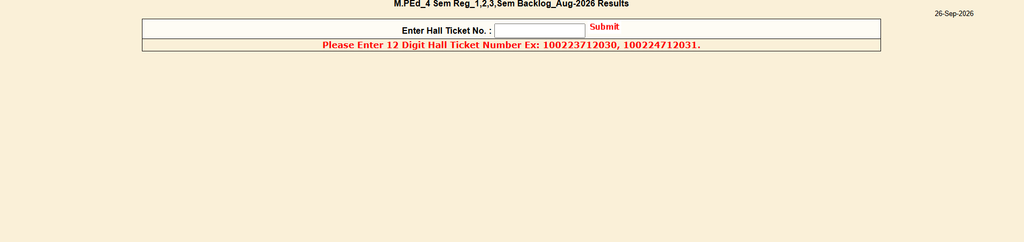
Osmania University has released its M.P.Ed semester and backlog results for the August 2026 examinations. The university’s official results listing gives the release date as September 26, 2026.
The result covers M.P.Ed fourth-semester regular candidates and first-, second- and third-semester backlog candidates. Checking your subject-wise marks and result status can help you confirm what you’ve cleared and whether you need to take another exam.
Use the official result portal to check your score, review the details shown and save a copy for your records. If something looks wrong or you need to apply for a result review, follow the university’s current instructions.
Osmania University M.P.Ed Semester and Backlog Results: Official Scope
Confirm the semester and exam session
The official Osmania University results listing names the result as “M.PEd 4 Sem Reg 1,2,3 Sem Backlog Aug-2026 Results.” This means the notice is for fourth-semester regular exams and first-, second- and third-semester backlog exams.
Check that your semester and candidate category match before opening a result. Students who took a different M.P.Ed exam should look for a separate notice.
Use the university’s result page
The university has a dedicated M.P.Ed results page for this result. Use that page or reach it through the official results listing, rather than relying on links shared by unverified sites or social media accounts.
The result page asks for a hall ticket number to look up a candidate’s result. Keep your hall ticket nearby before you start.
Note the release date
Osmania University’s listing gives September 26, 2026 as the release date. The exam session named in the listing is August 2026.
The page does not state an application deadline for revaluation or recounting. Check the university’s official notices for any next-step dates or rules.
How to Check Osmania University M.P.Ed Semester and Backlog Results
Open the matching result
Visit the official results listing and find the M.P.Ed entry for the August 2026 exams. Confirm that it says fourth semester regular and semesters one to three backlog before you proceed.
You can also open the direct M.P.Ed result page. This helps avoid confusion with older M.P.Ed results or results for another exam session.
Enter your hall ticket number
Type the hall ticket number requested on the page. The result portal specifies a 12-digit hall ticket number, so check each digit against your hall ticket before submitting.
If the page does not return a result, recheck the number and confirm you opened the right semester and exam category. Avoid sharing your hall ticket details in public posts or comments.
Save a copy for your records
When your result appears, download or print the page if those options are available. Keep the copy with your hall ticket until you receive or access the official marks memo, if one is issued separately.
A saved copy can also help if you need to ask your college or the examination branch about an error. Make sure the text is readable before closing the page.
Read Your Result and Check Every Subject Carefully
Review marks and result status
Go through each paper shown on the result page and note the marks or status listed for it. Don’t assume a grade scale or pass mark based on another course or year.
If you’re unsure how a result code or mark is assessed, check the rules for your batch and course. Your college can also direct you to the relevant university regulation.
Check backlog papers one by one
Backlog candidates should confirm the status of every paper they attempted. Make sure the result matches the semester and paper you registered for, especially if you had more than one backlog.
A cleared paper and an uncleared paper may lead to different next steps. Record each paper’s result so you can compare it with your exam record.
Verify your personal details
Check your name, hall ticket number and semester against your own documents. Also review any other exam details shown on the result page.
If a detail appears incorrect, save a screenshot or printout and keep your hall ticket ready. Contact your college or the university through an official channel to report the issue.
Take the Right Next Step if Your Result Needs Attention
Report a missing or incorrect result
If your result does not load or an entry appears wrong, first confirm the hall ticket number and result category. If the issue remains, contact your college or the university examination branch through official channels.
Keep your hall ticket, exam details and a copy of the displayed result nearby. These details can help staff identify the record you’re asking about.
Check revaluation or recounting rules
Students who want a review of their marks should check the relevant university notice for available options. Osmania University’s official examination press notes are one place to look for announcements about valuation, photocopies and related processes.
The notice for your exam session should state whether you can apply, how to submit the request and the deadline. Do not rely on dates or fees copied from an older notice.
Plan for another backlog attempt
If a paper remains uncleared, check the next eligible exam and registration steps through official university or college notices. The timetable and application process can change between sessions.
Ask your college to confirm which paper you need to register for and which rules apply to your batch. Keep a copy of any submitted form or fee receipt.
Keep Track of Marks Memos, Deadlines, and Further Updates
Watch for marks memo updates
The online result may not be the only record you need. Check the university results page and your college notices for updates on the official marks memo or other documents.
Do not assume when a marks memo will be issued. Follow the university’s announcements for the latest details.
Follow verified university and college channels
Use official Osmania University pages and your college’s verified channels for updates on corrections, review requests and exam schedules. Third-party sites can help point to a result, but confirm important details with the university.
This matters most when an application window is open or a timetable changes. Use the latest official notice before taking action.
Keep important records together
Save your result, hall ticket and any notice linked to an application or exam. If you submit a review request, keep its receipt and note the submission date.
These records make it easier to follow up if a result needs correction or a document is missing. Store digital copies somewhere you can find them later.
Conclusion
The Osmania University M.P.Ed result released on September 26 covers fourth-semester regular candidates and first-, second- and third-semester backlog candidates for the August 2026 exams. Check your hall ticket number, review every paper and save a copy of the result. For any correction, revaluation or next exam, follow the latest instructions on Osmania University’s official pages.